
SEO Insights
Google Ads invalid traffic card: why estimated savings do not reduce your bill twice
“Google says it saved us US$500. Why is the bill still so high?”
A store owner can reasonably ask that question. The answer depends on when the activity was identified and whether the cost was ever charged. Mixing avoided charges with later credits can make a monthly report understate acquisition costs.
Google announced the Invalid Traffic Overview Card on 12 November 2026. We checked the announcement and Help documentation on 15 November and recalculated the illustration below. No advertiser account, live card or actual credit was tested. Announcement
The Help page now gives a route
Open Campaigns → Overview → Invalid traffic. Help describes an account summary for the selected date range; View details adds daily and campaign breakdowns and invoice links. Access is gradual. The documents checked provide no complete card eligibility matrix, minimum spend, separate subscription price or rollout completion date. Check your own account before promising availability in Hong Kong or another market. Card documentation
Keep adjacent features separate. The Invalid Activity Credit Report explicitly supports Search and Performance Max. That does not establish the card’s campaign coverage. Separate invoice-format controls have invoicing-account and administrator requirements. Credit report · Invoice settings
Google had already announced the Search/PMax credit report in April 2026. November’s card makes the protection figures more visible, especially the estimated avoided cost; it is not the first opportunity to inspect a billing credit. April announcement
Keep three kinds of evidence apart
| Record | What to do with it |
|---|---|
| Estimated savings | Track separately as estimated avoided charges; do not subtract again from cost that already excludes them |
| Credited cost | Match the actual adjustment to its original service period and campaign, checking whether it is already applied |
| Qualified leads, completed orders or approved commissions | Assess commercial outcomes under consistent attribution and cutoff rules |
These identified protection figures do not measure undetected invalid activity. A homemade savings-to-cost ratio cannot establish the account’s true invalid traffic rate.
Recalculate one illustrative month
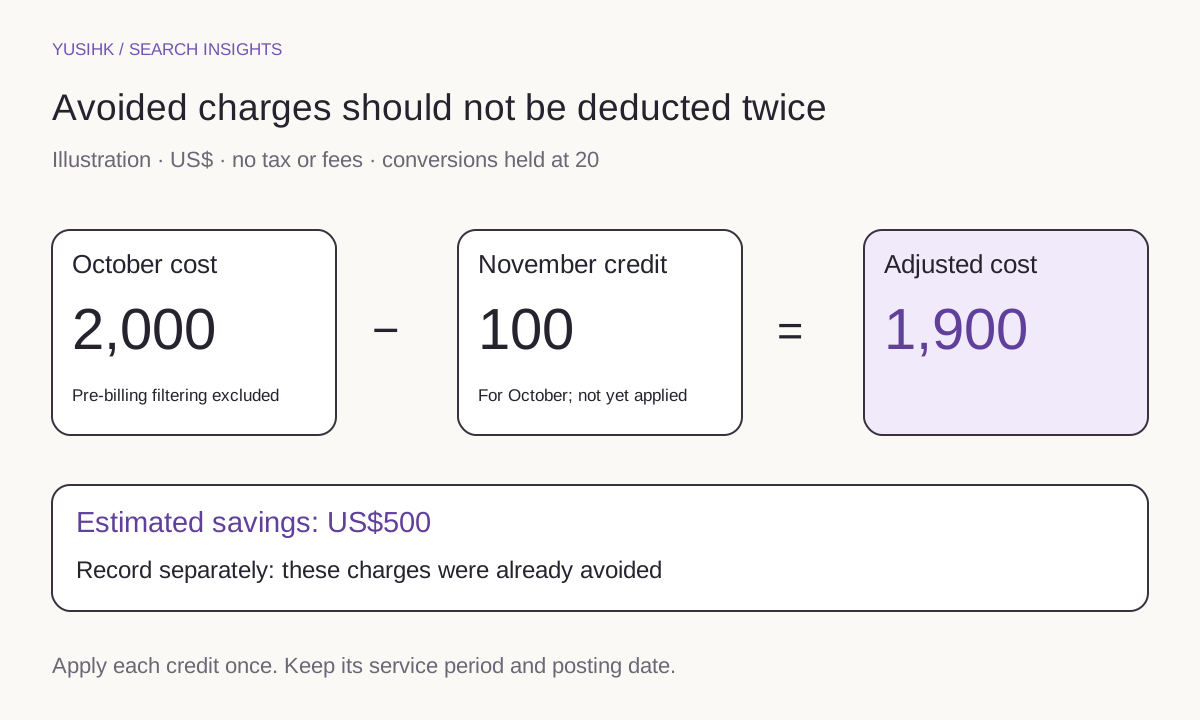
Assume October campaign cost is US$2,000, already excluding pre-billing filtered activity. Estimated savings are US$500. A US$100 credit arrives in November, specifically for that October campaign, and is not yet included in the cost figure. Exclude tax, fees and other adjustments; hold conversions at 20, with no later revisions.
For this management illustration, October’s retrospectively adjusted ad cost is 2,000 − 100 = US$1,900, or US$95 per conversion. Subtracting savings as well would produce US$1,400 and understate costs. If you start from Adjusted cost of US$1,900, do not subtract the credit again.
The report is available through Report Editor’s Template gallery as Invalid Activity Credit Report: Search & PMax, with credited and adjusted metrics. This performance reconciliation does not replace statutory accounting or tax treatment. Report definitions
For an affiliate site, compare the US$1,900 with approved commissions using the same attribution scope and data cutoff. Keep pending and reversible commissions separate. The merchant’s gross sales are not the affiliate’s revenue, and estimated avoided charges are not cash available to spend again.
Store both the service period and the credit date
Keep the account, currency, campaign, original service period, posting date, transaction reference, extraction date and applied status. Save a month-end baseline and version later revisions. One credit displayed in three places is still one adjustment.
Late credits do not rewrite the standard campaign table’s historical metrics. An unchanged October CPA therefore does not by itself show that a credit failed. Consult the dedicated report, with its timing and rounding considerations. Billing and campaign differences · Report considerations
When costs jump, investigate before labeling fraud
Save the affected period, then compare change history, bids, budgets, locations, queries or placements, and whether the landing page, form and checkout work. These are diagnostic suggestions rather than evidence that a particular visit was fraudulent.
Google’s 30% figure describes its reported average reduction in advertiser exposure to invalid leads during 2026. The announcement provides no full account-level sample or calculation. It does not predict a 30% CPA improvement for your store. Original claim
Keep CRM outcomes such as qualified, duplicate, unreachable and unsuitable leads distinct. For suspected missed activity, Google documents an investigation window of 60 days. Prepare relevant dates, campaigns, click identifiers and server evidence for the official support route. Investigation guidance
Restrict evidence access, avoid publishing customer identifiers, and define retention. If separately uploading customer data for measurement, check the applicable consent and Google data-policy requirements for that use. An investigation file and a remarketing list serve different purposes. Customer data policy
Ask what an extra tool adds
A monitoring vendor should distinguish activity already excluded from Google billing from additional reductions in spam handling or other demonstrable costs. Compare incremental benefit with fees, setup effort and the risk of blocking real customers. Do not attribute the entire Google savings figure to the vendor.
This is a paid-media reporting update, with no announced organic-ranking benefit. Keep SEO visits, paid acquisition and site conversion failures separate. The Ads Decoded product-page guide explains the related landing-page decision.
Before asking how much was refunded, put the service period, posting date and already-applied adjustment on the same page. That is a better starting point for explaining what the business actually paid.